WordPress 7.0 beta 1 is now available for testing. We have been spending time trying it out, and we believe this is one of the most meaningful updates in recent years.
The official release is scheduled for April 9, 2026 and will bring features that will genuinely change how we create and manage content. These include an easier way to integrate AI features into WordPress, an improved dashboard, and potentially real-time collaboration in the editor.
Read on to learn what’s coming in WordPress 7.0 and what that means for your website.
TL;DR: What’s coming in WordPress 7.0
- Real-time collaboration that allows multiple users to work on the same post or page without losing any data.
- AI Web Client API that allows users to save their AI credentials and provides plugin and theme developers a standardized way to integrate AI features in WordPress.
- Admin design refresh offers smoother transitions between admin area screens with modern typography and new color profile.
- New Icon and Breadcrumbs blocks will be added. Several blocks will get new features and enhancements.
ℹ️ Note: This beta release is for testing and development only. So, please do not install, run, or test this version of WordPress on your live website.
Instead, we recommend using a staging site or a local site. You can test WordPress 7.0 Beta by installing and activating the WordPress Beta Tester plugin.
- Admin Visual Refresh & View Transitions
- Web Client AI API in WordPress
- Real Time Collaboration (In Development)
- Visual Revisions For Pages
- Cover Block Video Embeds
- Navigation Block Overlays & Improvements
- New Breadcrumbs and Icons Blocks
- Per-Block Instance Custom CSS
- Pattern Editing Modes
- Responsive Grid Block
- Heading Block Variations
- Font Library Enabled for All Themes
- Client-Side Media Processing
- Under the Hood (Developer & Performance Updates)
- Conclusion
Admin Visual Refresh & View Transitions
The WordPress backend is getting a much-needed facelift.
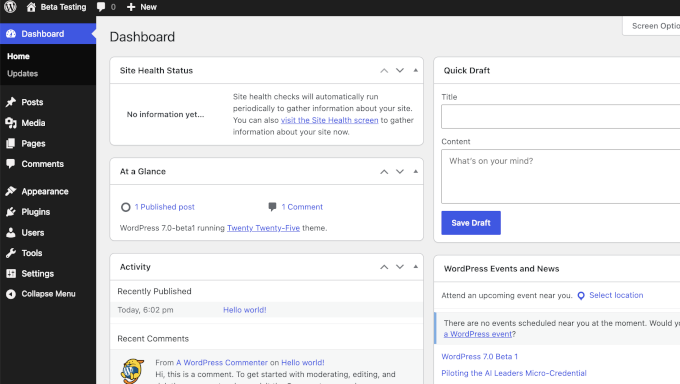
WordPress 7.0 will deliver a visual update to the dashboard with a fresh default color scheme, updated typography, and a cleaner, modern interface.
However, it is not just about looks.
In our testing, we found that the transitions from dashboard to editor and document view feels smoother.
As you click through different settings pages, the dashboard no longer feels like it is doing a hard reload. Instead, elements smoothly transition and slide into place.
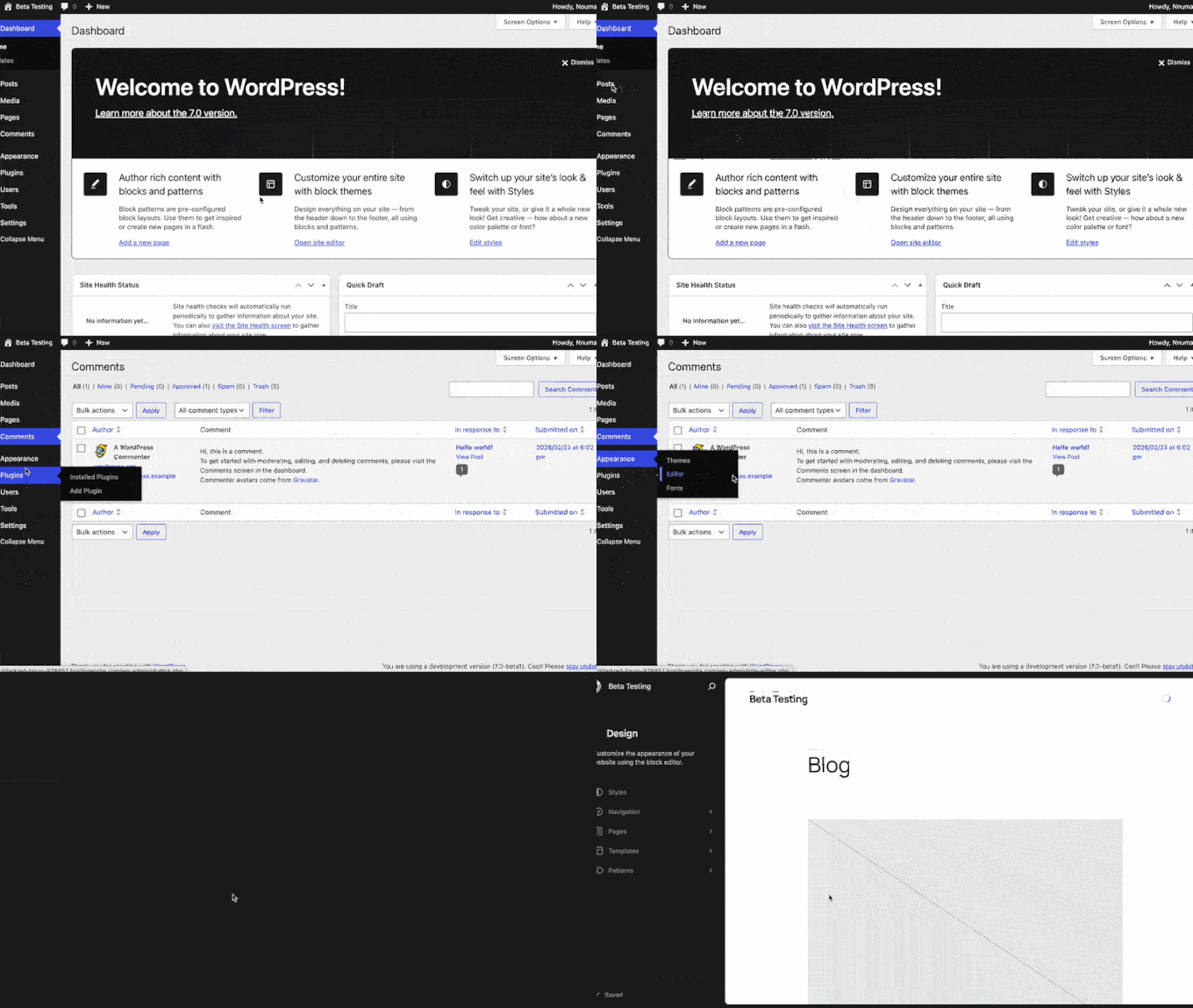
Navigating the WordPress backend now feels faster and more like a modern web app. The cleaner layout reduces eye strain, and the fluid animations make managing your website a smoother experience.
Related: See how WordPress admin area evolved over the years.
Web Client AI API in WordPress
AI is changing how we build websites. As part of on-going AI infrastructure work, WordPress 7.0 will ship with a new Web Client AI API.
The new API acts as a central hub for generative AI models inside your site’s backend.
Instead of multiple plugins fighting for control or cluttering the interface, the Web Client AI API works with the new Abilities API to keep things organized.
For beginners, this matters quite a bit. It opens the door to AI features right inside the block editor.
For instance, you will be able to safely store credentials for your favorite AI model securely inside WordPress. Your WordPress plugins and themes can then use your preferred model to provide different features.
In the near future, you will be able to generate content, summarize articles, or handle repetitive admin tasks without leaving your dashboard.
However, we want to be clear that this is the foundation, not the finished product. The real value will come as plugin developers build on top of it.
Pro Tip: If you want to start using AI on your WordPress site right now, check out our small business owners’ guide to artificial intelligence to get a head start before 7.0 officially drops.
Real Time Collaboration (In Development)
Note: The real time collaboration feature is not included in the beta-1 release that we tested. However, it is under active development and it is not yet confirmed whether or not it will make it into the final 7.0 release.
Real-time collaboration in WordPress editing started with WordPress 6.9, which introduced inline commenting known as Notes. WordPress 7.0 will continue building up on that.
If you have ever been locked out of a WordPress post because someone else was editing it, then you will appreciate this feature.
WordPress 7.0 comes with a sync-engine allowing real-time collaboration. This enables multiple users to edit a post or page at the same time.
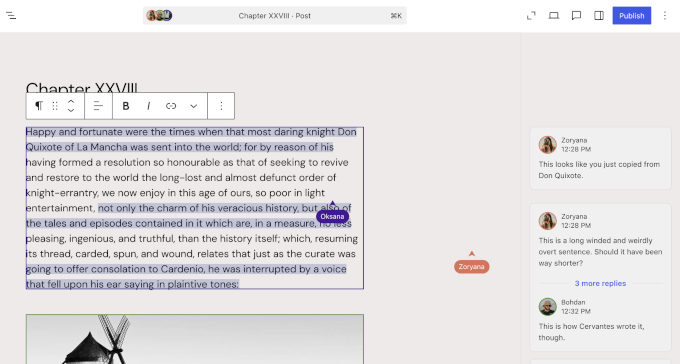
Similarly, users adding inline comments or notes will also be visible to other users working on the same content in real-time.
It will be very similar to working in Google Docs. The system handles data syncing smoothly and even supports offline editing. This is a big deal for content teams.
For example, a writer can draft a paragraph while an editor fixes typos in the section above. And a designer can tweak the layout of an image block below. Everyone works on the same page without locking each other out.
Visual Revisions For Pages
The WordPress revisions system has always been useful for undoing mistakes. However, comparing changes meant looking at raw text or HTML code, which is not ideal.
WordPress 7.0 will change this by introducing new visual revisions for Pages.
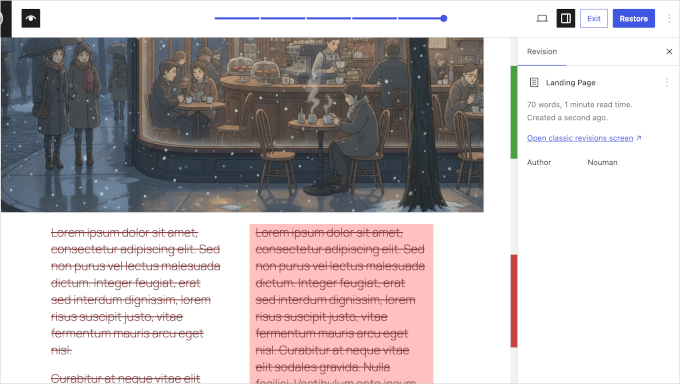
In our testing, we were happy to see that you can now view exactly how the layout, images, and content changed — all within the visual editor.
The interface shows a side-by-side or highlighted comparison of past edits, rendering the blocks as they would appear on the front end.
For beginners, this makes a real difference. If someone accidentally deleted a pricing table or messed up a gallery layout, then you can see the visual change right away. You can then restore the correct version with a single click.
However, we would like to see visual revisions for posts as well. Hopefully, it will be implemented for other post types in future.
Cover Block Video Embeds
The Cover block is one of the most popular tools for creating hero sections and banners.
WordPress 7.0 will let you use video embeds via URL as backgrounds in the Cover block.
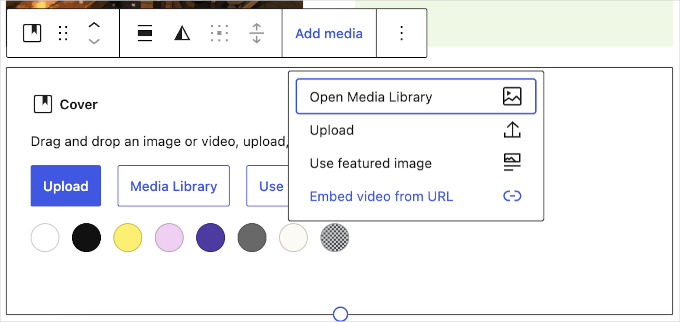
When we tested this, we found it simple to use. You insert a Cover block, upload your video, and WordPress handles the looping background. You can still overlay text, buttons, and other blocks on top.
This opens up more design options because you can create dynamic headers that grab attention the moment someone lands on your site.
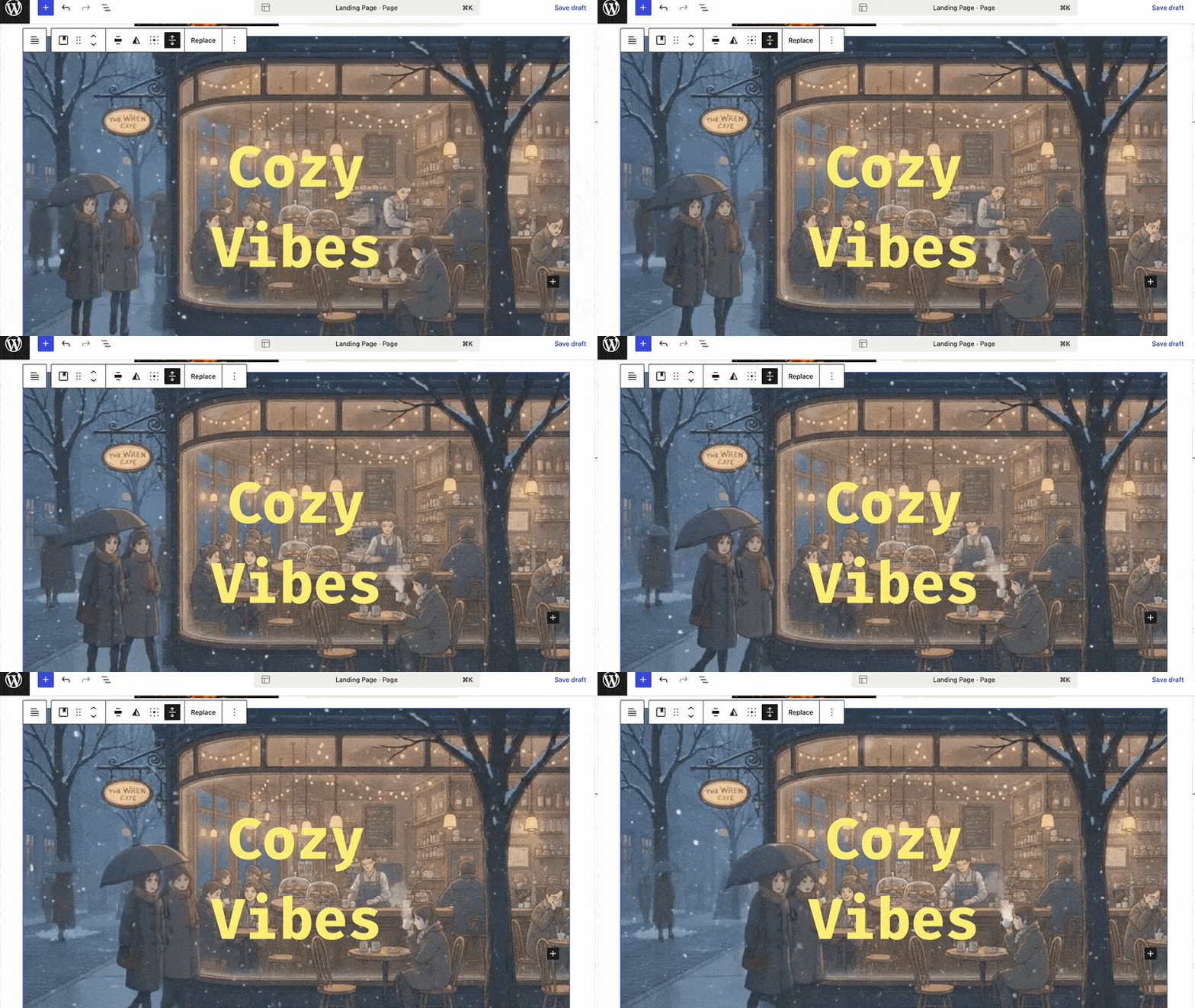
However, the best part is that you do not need extra plugins. You can do all of this with core WordPress blocks.
Navigation Block Overlays & Improvements
Mobile menus can be tricky to get right. WordPress 7.0 will bring important improvements to the Navigation block to address this.
The update introduces customizable overlays as template parts. Mobile menus can be hidden or shown based on custom breakpoints.
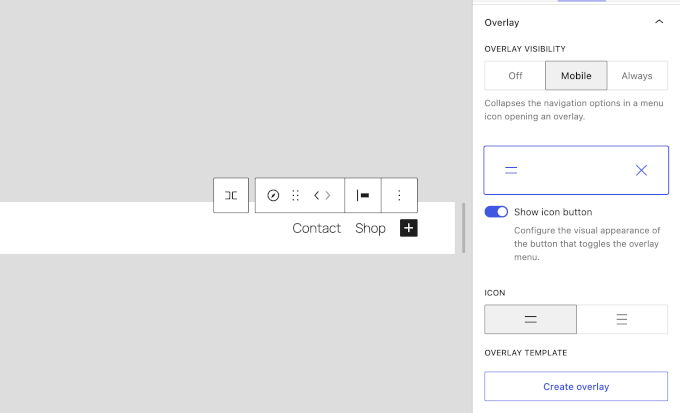
In our testing, we liked that the Navigation block defaults to always showing overlays for new blocks. When a visitor views your site on a smaller screen, they get a clean hamburger menu that expands into a well-styled overlay.
Building mobile menus is also more reliable. You have full control over how navigation looks on phones and tablets without writing CSS media queries.
New Breadcrumbs and Icons Blocks
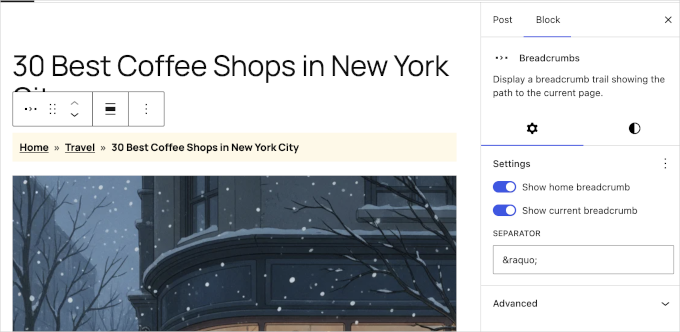
WordPress 7.0 will add two blocks that many people have been asking for: Breadcrumbs and Icons. Both used to require separate plugins.
We found the Breadcrumbs block particularly useful. Breadcrumbs are important for SEO because they help search engines understand your site structure and give users an easy way to navigate back.
The block also improves site navigation hierarchy and supports the theme.json schema, so it automatically adapts to your site’s global styles.
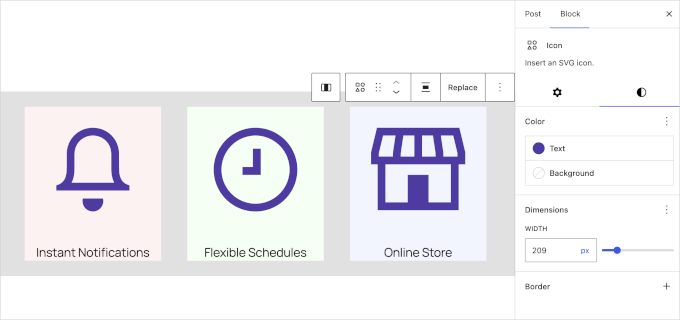
On the other hand, the Icons block will let you insert scalable vector graphics (SVGs) anywhere in your content without touching any code.
Previously, users had to rely on separate plugins to add icon fonts to their website. Now, they can simply use the default block anywhere they need.
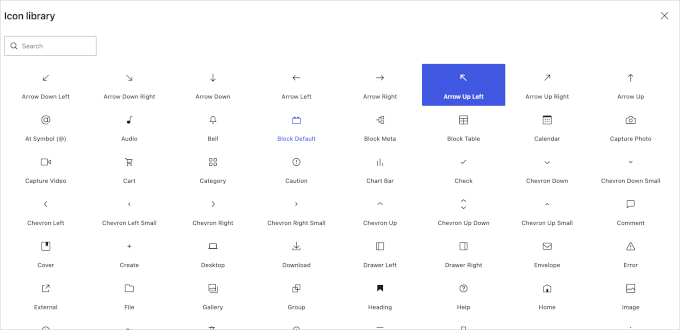
The current icon library is not as big as some other options like Font Awesome. But it has good selection of icons commonly used by WordPress site owners.
They are also quite easily customizable using default block settings. You can choose color, width (size), and background.
Per-Block Instance Custom CSS
For those who like to fine-tune their designs, WordPress 7.0 will introduce per-block instance custom CSS. It lets you add custom CSS to a specific block through the Advanced sidebar panel.
Simply put, you can not only add a custom CSS class to any block, but also write the custom CSS right there in the block setting.
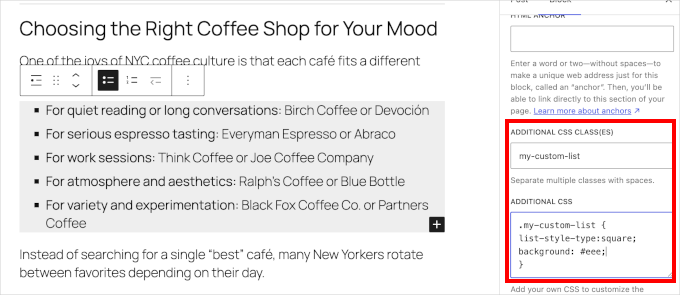
This is useful for advanced users and designers. You can tweak the look of a single element — like adding a drop shadow to one specific button — without creating child themes or writing complex CSS selectors.
Pattern Editing Modes
Reusable patterns are great for keeping your site design consistent. However, editing them can sometimes be confusing.
WordPress 7.0 will address this by introducing new pattern-level editing modes that help you focus.
We found the new “Spotlight mode” to be very helpful. It isolates the content within a pattern and dims everything else on the page. You know exactly what you are modifying.
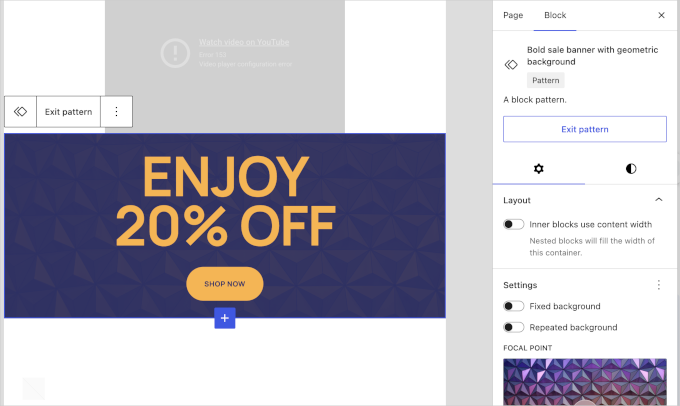
There is also a new “Isolated Editor mode” for synced patterns and template parts. Users can opt out of the default content-only mode if they prefer full control.
Responsive Grid Block
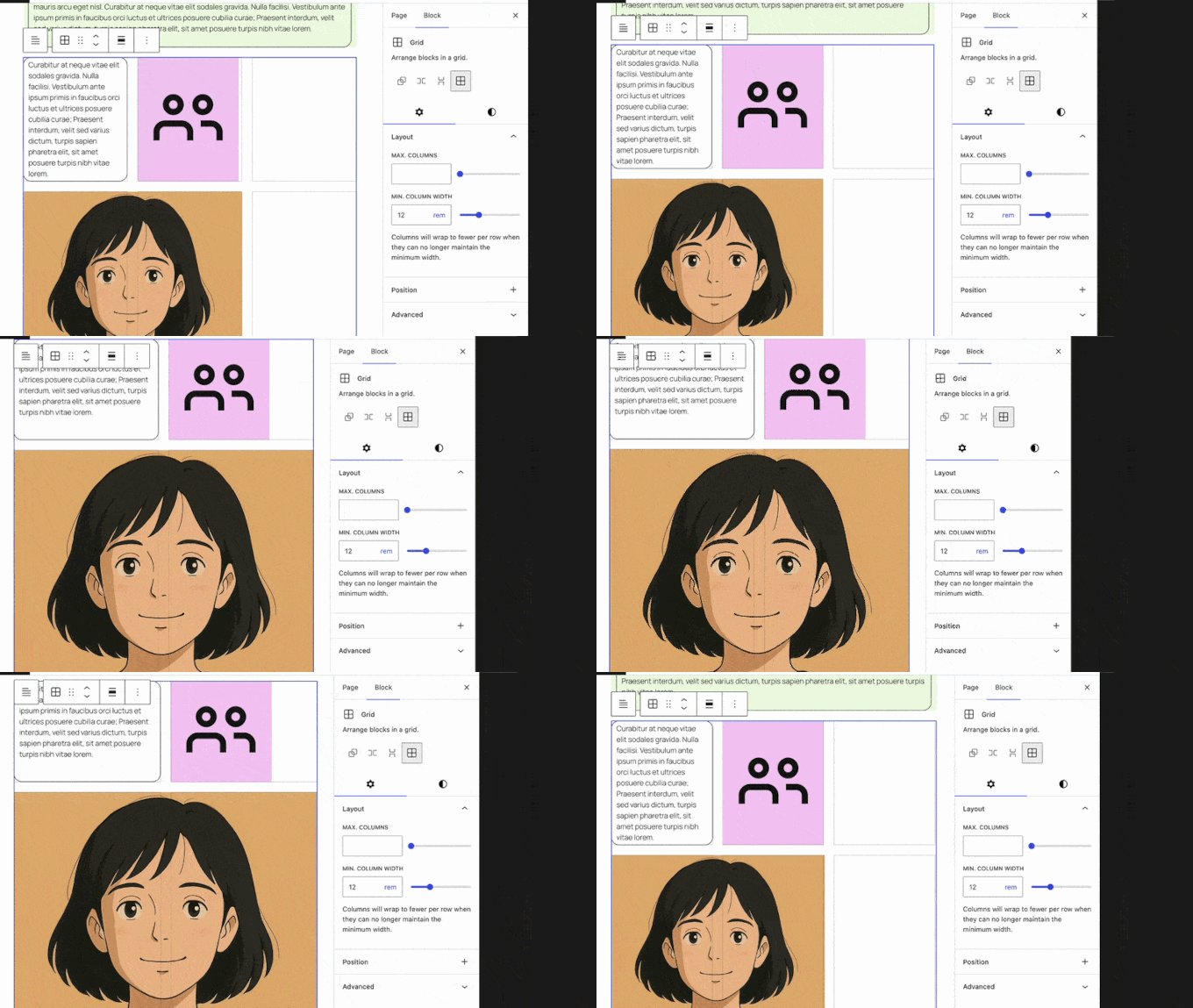
Displaying images and structural layouts will get a solid upgrade in WordPress 7.0 with enhancements to the Grid block.
In our testing, we found that the Grid block is fully responsive out of the box. It adapts smoothly across different screen sizes without requiring manual column adjustments.
Heading Block Variations
Structuring your articles properly is important for SEO and AI Search Optimization. WordPress 7.0 makes this process faster by registering heading levels (H1 through H6) as block variations.
When we tested the editor, we found new quick-access icons added directly to the block’s toolbar and sidebar.
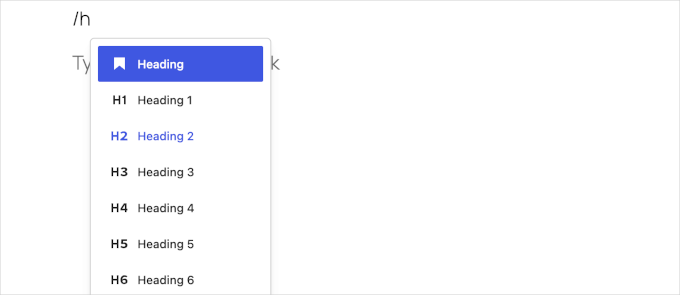
Instead of clicking a dropdown menu to change an H2 to an H3, you can transform between heading levels with a single click.
This is a small but useful workflow improvement. It helps you structure your content properly for both readers and search engine crawlers. Overall, your articles become easier to scan and properly indexed.
Font Library Enabled for All Themes
The Font Library was a useful addition in recent WordPress updates. However, it was largely restricted to block themes.
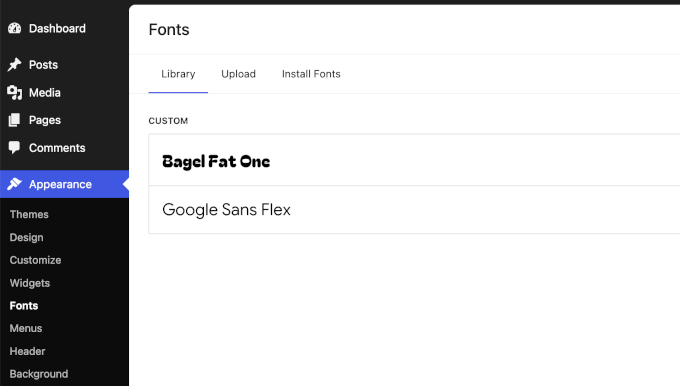
With WordPress 7.0, the Font Library screen will be enabled globally for all themes.
We were pleased to find that site editors can now browse Google Fonts, upload local font files, and organize typography collections regardless of their active theme. Whether you are using a block theme or a classic legacy theme, the Font Library modal is available to you.
Client-Side Media Processing
Uploading large images has traditionally put a heavy load on web servers. This sometimes leads to timeouts or errors.
WordPress 7.0 will address this by introducing client-side media processing.
It will use your web browser’s capabilities to handle image resizing and compression before the file is even uploaded to the server. It also brings better support for modern, advanced image formats.
This is a solid bump for WordPress speed and performance. Uploading images will be faster and more reliable, especially on slower internet connections.
It also saves your web hosting server space and processing power by compressing files right in your browser before the upload begins.
Under the Hood (Developer & Performance Updates)
WordPress 7.0 is packed with technical improvements designed to make the platform faster, more secure, and easier for developers to build on.
Here are the most notable under-the-hood changes:
- Client Side Abilities API: Introduces a standardized client-side registry for WordPress capabilities, including an Abilities and Workflows API, filter/search functionality, and an improved command palette UI (#73076). This lays the groundwork for fast, app-like features.
- Always-iframed Post Editor: The post editor is now always iframed, regardless of the API version of the blocks used. This ensures a consistent experience and separates UI styles from your theme styles (Dev Note).
- PHP-only Block Registration: Developers can now generate blocks and patterns entirely server-side using PHP. These auto-register with the Block API and include auto-generated inspector controls (#71792).
- UI Primitives and Components: The WordPress UI package receives a big update with new standardized components, including dropdowns, tooltips, fieldsets, and visually hidden elements (#73076).
- CodeMirror Update: The CodeMirror library will be updated to version 5.65.40, allowing for more flexible extensibility for code editing interfaces (Dev Note).
- PHP Version Support Changes: WordPress 7.0 officially drops support for older, insecure versions of PHP (7.2 and 7.3.). Make sure your server is updated (Dev Note).
Conclusion
We are excited about the upcoming release of WordPress 7.0. This version feels like a meaningful step forward, bringing modern web app capabilities directly into the core platform.
Our favorite additions are the Real Time Collaboration (if it makes into the final release) and the AI Web Client API. The ability to work on a post at the same time as a team member without getting locked out is a big deal for editorial teams.
Combined with the smooth transitions of the new admin interface, WordPress feels better to use than ever.
If you liked this article, then please subscribe to our YouTube Channel for WordPress video tutorials. You can also find us on Twitter and Facebook.
The post What’s Coming in WordPress 7.0? (Features and Screenshots) first appeared on WPBeginner.
from WPBeginner https://ift.tt/nx09DeZ
via IFTTT

No comments:
Post a Comment